Know Exactly Where Your Money Goes
Automatic expense categorization, visual spending breakdowns, and trend analysis that helps you find savings you didn't know you had.
Spending Clarity in Seconds
Stop guessing where your money went. Genesis Budget categorizes every transaction and gives you a clear picture of your spending habits. See your top categories, spot unusual charges, and understand your real cost of living.
- Auto-Categorization: Transactions are sorted into categories automatically
- Custom Categories: Create your own categories that match how you think about spending
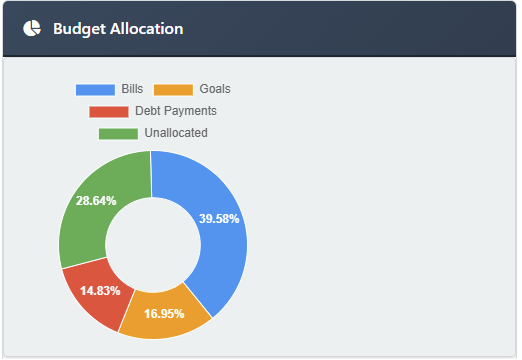
- Spending Charts: Pie charts, bar graphs, and trend lines that make data visual
- Monthly Comparisons: See how this month stacks up against last month or last year
Spot Trends Before They Become Problems
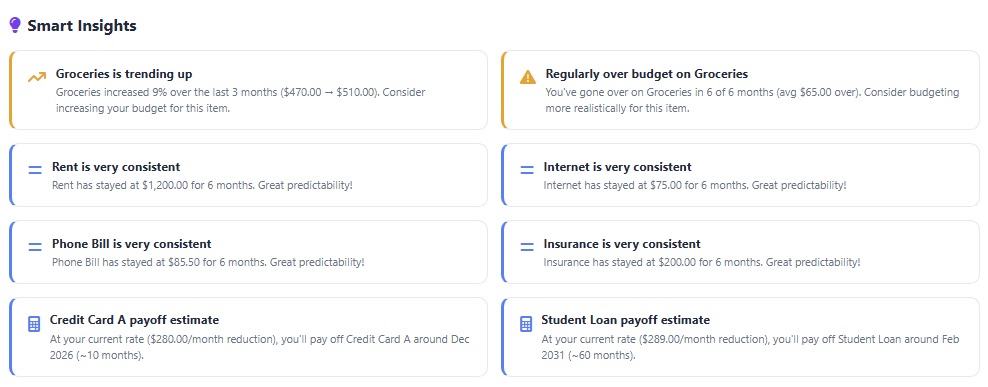
Is your grocery bill creeping up? Are subscription costs growing faster than you realized? Spending trends show you the bigger picture so you can make adjustments before small changes turn into budget busters.
Compare spending across months, categories, and time periods to understand the patterns that shape your financial life.
Why Tracking Spending Changes Everything
Smart Categorization
Every transaction is automatically categorized, saving you hours of manual sorting and giving you instant insights.
Visual Breakdowns
Pie charts and bar graphs make it crystal clear where every dollar is going — no spreadsheets required.
Find Hidden Savings
Most users discover $200+ in monthly savings within their first week just by seeing where the money actually goes.
Spending That Talks to Your Budget
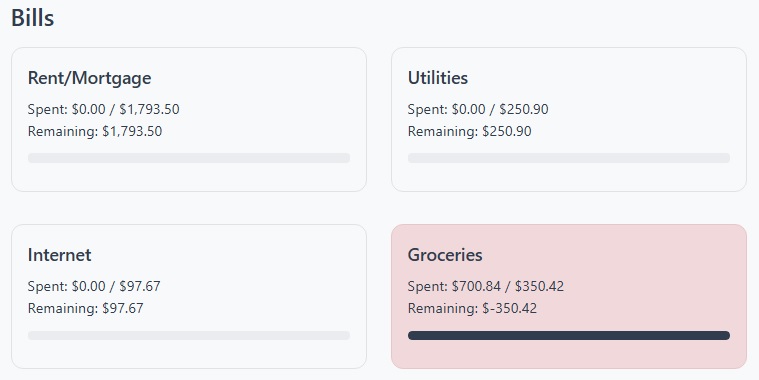
Your spending data feeds directly into your budget. When you spend money in a category, your budget updates instantly so you always know how much room you have left. Over-spend in one category? You'll see it right away with color-coded alerts.
This tight connection between spending and budgets means no more end-of-month surprises.
Why You Enter It Yourself
Genesis Budget doesn't link to your bank. There's no import, no sync, no feed. You type in what you spent. That surprises people, so here's the reasoning.
A bank feed tells you where your money went. A budget tells your money where to go. Those are opposite skills, and only one of them changes the outcome. By the time an imported transaction appears on your screen, the decision is already made and the money is already spent. Dropping it into a category afterward feels like managing your money, but you're filing a receipt.
Entering it yourself takes a few minutes a week, and those few minutes are the point. You handle every purchase a second time. You notice the subscription you forgot you had. You feel the fourth takeout order in a way no pie chart on the 31st will ever make you feel. Bank imports tell you where your money went; entering each transaction yourself teaches you why it went there — and how to make better choices next time.
So the tracking here isn't a report on what happened to you. You decide where every dollar is going at the start of the month, and logging what you spend is how you hold yourself to it. The first month takes the most effort. After that, you already know what's coming. Read the full reasoning.
Start Tracking Your Spending Today
See where your money goes and take control of your financial future with clear, visual spending insights.
Get Started FreeNo credit card required. Free 30 day trial.